Product Sync
A standalone API. You call POST /products/sync whenever your catalog changes. Each affected
product is one entry in the products array, and each entry is resolved independently.
POST https://store.billease.ph/be-store-admin-api/products/sync
Authorization: Bearer <your-token>
Content-Type: application/json
{
  "shop_code": "3c9b1f2a-7d5e-4c11-8a6f-2b9d0e7c1a42",
  "mer_code": "8f1c2b7a-3e5d-4c11-9a6f-2b9d0e7c1b13",
  "products": [
    { "id": "1000001", "in_stock": 12 },
    { "id": "1000002", "name": "Acme Tab 11 Wi-Fi 128GB" },
    { "id": "1000003", "status": 2 },
    { "id": "1000004", "status": 1 }
  ]
}
There is no scheduled pull on our side. If you do not call, nothing changes.
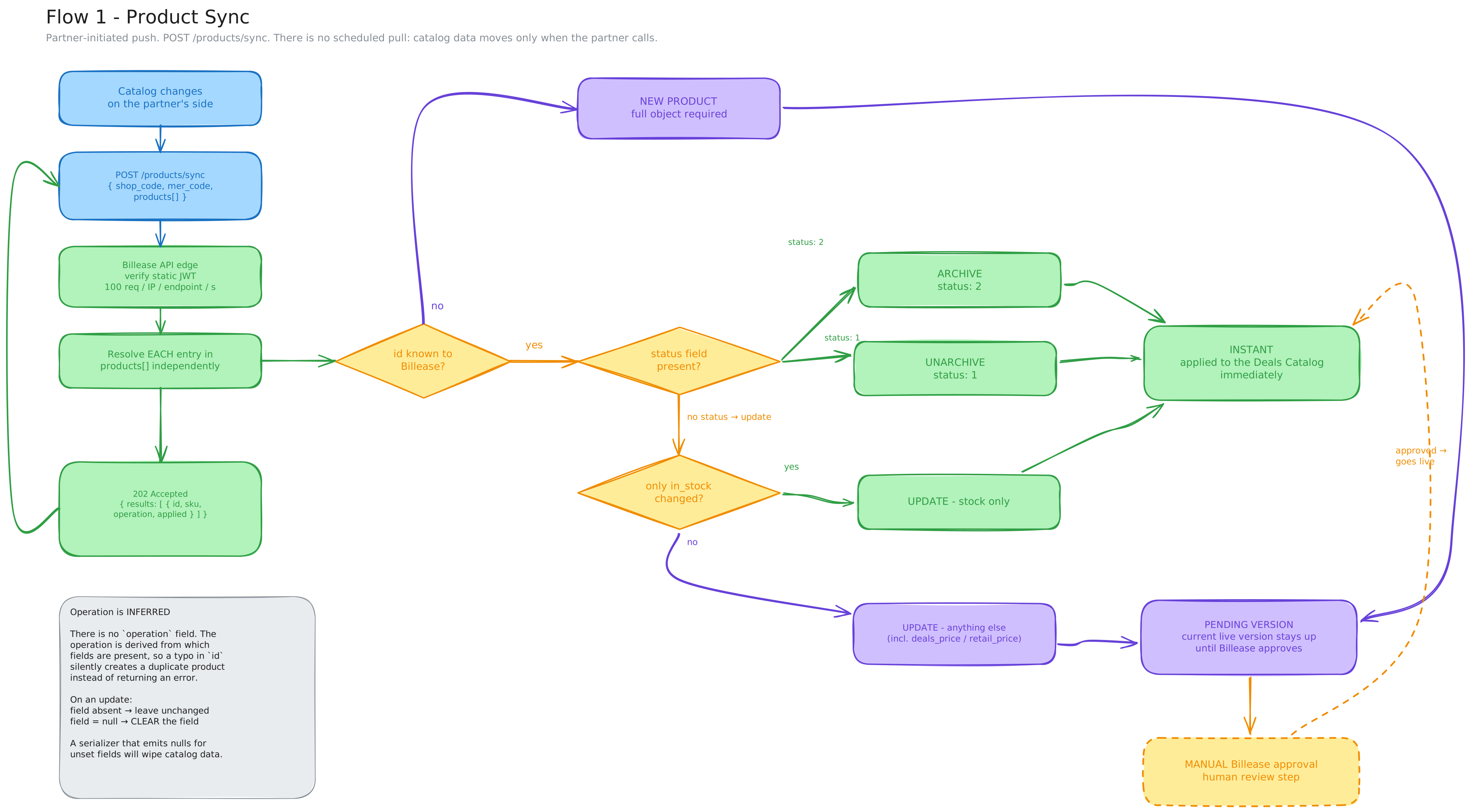
The four operations
There is no operation field; we infer what you meant from the fields you send.
| Operation | What you send | Approval |
|---|---|---|
| New product | The complete product object, with an id we have not seen | Pending approval |
| Update | id + only the fields to change, no status | Instant for stock only; otherwise pending |
| Archive | id + status: 2, nothing else | Instant |
| Unarchive | id + status: 1, nothing else | Instant |
id must be stableWe key everything on id and map it to our internal sku. If an id changes (a leading zero
appears, or a type coercion turns 1000001 into 1000001.0), we treat it as a brand-new product,
create a duplicate, and silently stop updating the original.
Treat id as immutable, and never reuse one.
Approval
New products, and any edit other than a pure stock change, create a pending version. Your currently-live version stays up until we approve the new one.
| Change | Applied |
|---|---|
in_stock alone | Instantly |
status: 1 / status: 2 | Instantly |
| Price, name, description, device specs, images, taglines, links | Pending approval |
The category is an immutable field. If you wish to edit an existing product's category, archive that
old product and create a new product (with its own unique id) with the correct category.
The sync response tells you a pending version was created. It does not tell you what happened to it
afterwards. For that, poll GET /products for the product you pushed:
GET /products?product_id={your unique id}
The status on the returned product tells you where it stands:
status | Meaning |
|---|---|
1 | Active / approved (the live version) |
2 | Archived |
3 | Pending our approval |
4 | Rejected; see message |
You only ever send 1 or 2. 3 and 4 are ours, and appear only on the read endpoint.
Updates: absent vs null
On an update, omit what you are not changing:
{ "id": "1000001", "in_stock": 12 }
| You send | We do |
|---|---|
| Field absent | Leave it unchanged |
Field = null | Clear it |
A serializer that emits null for unset fields will wipe every optional field on the product.
This is the default in several common libraries:
- Jackson: add
@JsonInclude(JsonInclude.Include.NON_NULL) - Go
encoding/json: add,omitemptyto the struct tags - Pydantic: use
.model_dump(exclude_none=True)
Send a single-product update to staging and read it back with GET /products before you run a full
sync.
To replace the image set, send the complete image_url array; it is not merged.
Categories and device specs
category must be one of the values we recognize, not case-sensitive, and each category permits its
own set of keys inside device.
Do not hardcode the list. Read it at build time:
GET /categories
{
  "categories": [
    {
      "category": "Mobile phone",
      "device_keys": ["device_brand", "device_color", "device_camera", "device_display",
                      "device_processor", "device_memory", "device_storage", "device_os"]
    },
    { "category": "Vouchers", "device_keys": ["device_brand", "device_merchant"] }
  ]
}
Device keys outside a category's list are not recognized and are dropped; the rest of the product is
stored. An unrecognized category, however, fails the whole call with a 400 Bad Request (the
batch is atomic, so nothing is applied); the body names the product:
{ "message": "product 2000100501 category not found: Invalid-name-category" }
Send only the categories and keys that GET /categories returns.
Images
{
  "url": "https://cdn.your-company.com/p/1000900/main.jpg",
  "hash": "9f86d081884c7d659a2feaa0c55ad015a3bf4f1b2b0b822cd15d6c15b0f00a08",
  "order": 0
}
urlmust be publicly reachable and stay reachable while the product is live.hashis the lowercase hex SHA-256 of the raw image bytes. We compare it against the stored value to decide whether to re-download, so it has to be computed the same way on both sides.orderis 0-based.
At least two images are required (the first image is the thumbnail, the second is for the product detail page); three or more is recommended.
Reading the response
The call is atomic. Either every entry passes validation and you get 202 Accepted, or the
whole batch is rejected with a 4xx and nothing is applied. We never process part of a batch.
A 202 returns one result per submitted product, in request order:
{
  "results": [
    { "id": "1000001", "sku": 50231, "operation": "update", "applied": "instant" },
    { "id": "1000002", "sku": 50232, "operation": "update", "applied": "pending_approval" }
  ]
}
applied is instant (already live) or pending_approval (a pending version was created; poll
GET /products for the outcome).
Error responses
On failure you get one of the statuses below with a JSON body that names the problem, e.g.
{ "message": "product 2000100501 category not found: Invalid-name-category" }. Fix it and resend
the whole batch.
| Status | Meaning |
|---|---|
400 | Malformed request, or a product with an invalid/unsupported combination of fields: a status other than 1 or 2, an unrecognized category, a missing required field, a duplicate product name, or deals_price above retail_price. |
401 | Missing or invalid JWT. |
403 | The JWT is valid, but the shop_code / mer_code does not belong to you. |
404 | An archive / unarchive references an id we do not have on record. |
413 | More than 1000 entries in one call. Split the batch. |
422 | Malformed request body (e.g. malformed mer_code or shop_code, or products not a list). |
429 | Too many requests. Back off and retry. |
500 | Unexpected error on our side. |
Because the batch is atomic, a 2xx means the entire batch was accepted and any 4xx means none
of it was. A pipeline that ignores the status code will treat a rejected batch as a clean sync.
Limits
- Maximum 1000 entries per call. Larger batches return
413. - 100 requests per second per endpoint. On
429, back off and retry.
For an initial catalog load, page through in batches of 1000 and check the results of each before sending the next.